
Home » Help » Getting Started » Change the phone number
November 2, 2025
When you create your Rembrr account with your Gmail account, the application automatically takes the information from your account. If your phone number is associated with your Gmail account, it will appear by default, but if you want to change it, it is very simple.
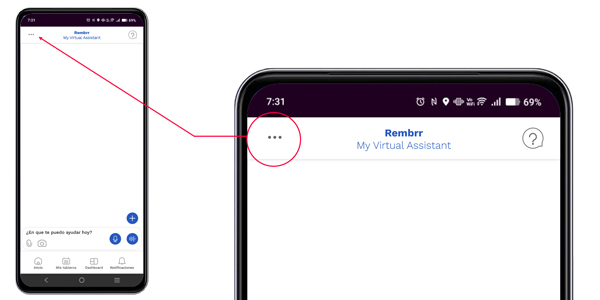
In the upper left corner you will find three dots . . . which provide access to settings.
Click on the three dots to enter the general settings.
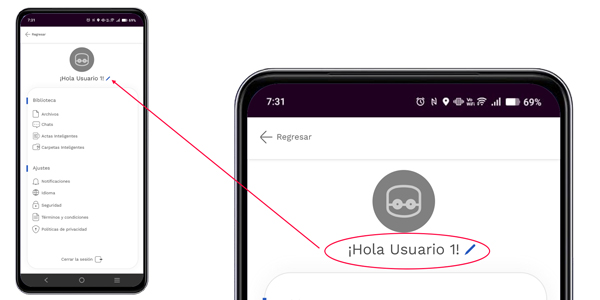
Click on the username to access the panel where you will find your personal data.
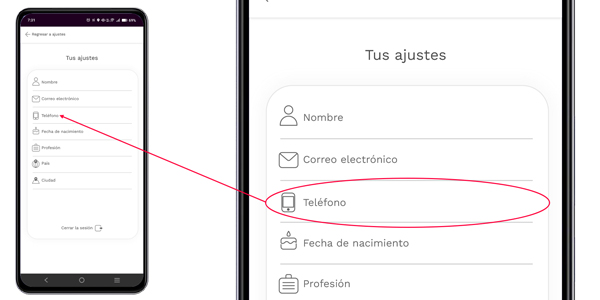
To access your phone number, simply click on the phone field to enter the option, then you can access it.
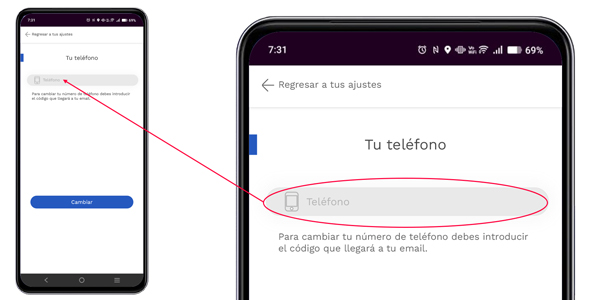
To change your phone number, click on the phone field, then enter the new phone number you want to associate with your account, and click change.
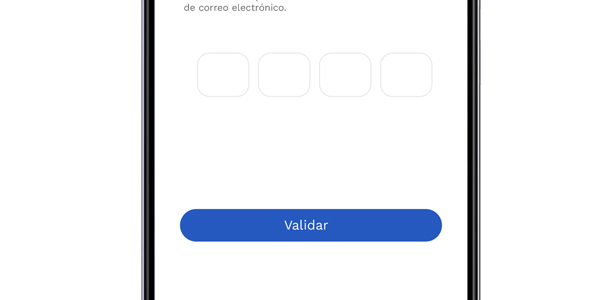
When you click on change, a text message is sent to your email. Enter it in this field to validate it. Then you can click return to your settings to exit.
It is highly recommended that you configure security levels on your phone, such as a PIN or fingerprint, as this can prevent your data from being stolen or changed.
Usamos cookies para que REMBRR funcione correctamente y para mejorar tu experiencia. Algunas cookies son esenciales, mientras que otras nos ayudan a analizar el tráfico o personalizar contenido y marketing.
Puedes aceptar todas las cookies, rechazar las no esenciales o gestionar tus preferencias.
Fill out the following form and we will contact you shortly.
Fill out the following form and we will contact you shortly.
Fill out the following form and we will contact you shortly.
Fill out the following form and we will contact you shortly.
Fill out the following form and we will contact you shortly.
Fill out the following form and we will contact you shortly.
Fill out the following form and we will contact you shortly.
Fill out the following form and we will contact you shortly.