
Home » Help » Getting Started » Your Profession
November 2, 2025
For Rembrr My Virtual Assistant, it is very important to know you in depth. Knowing your profession or field of work helps your assistant become more efficient, which is why we want to know it.
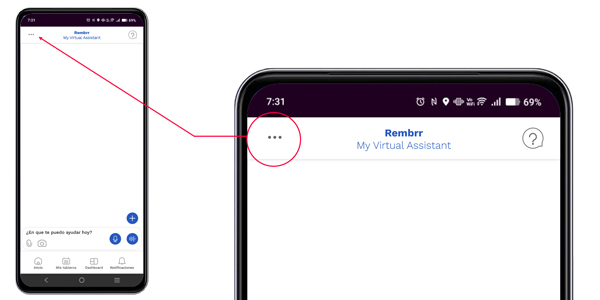
In the upper left corner you will find three dots . . . which provide access to settings.
Click on the three dots to enter the general settings.
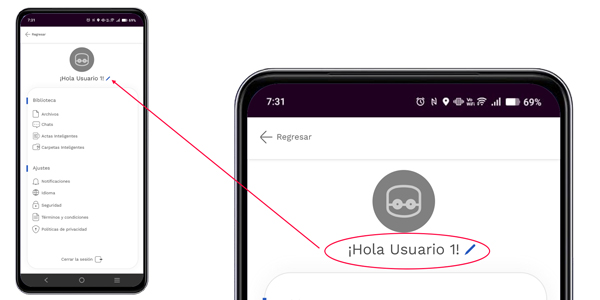
Click on the username to access the panel where you will find your personal data.
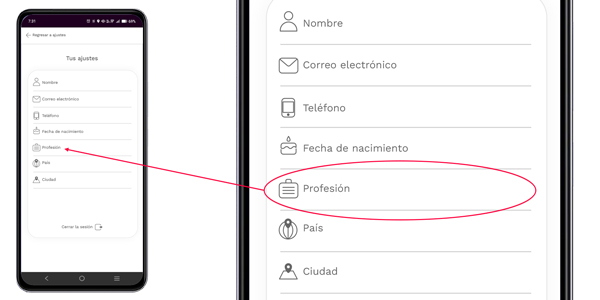
To access your profession, simply click on the profession field to enter the option, then you can choose your profession or field of work.
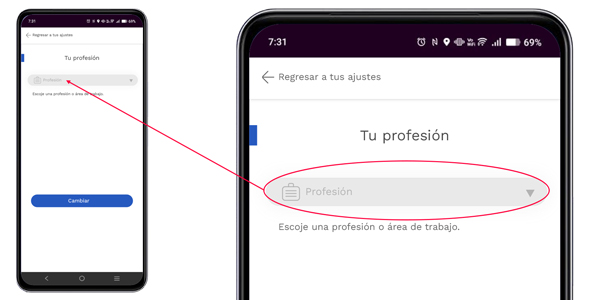
To change your profession, click on the Profession field. A long list of professions and fields of work will appear.
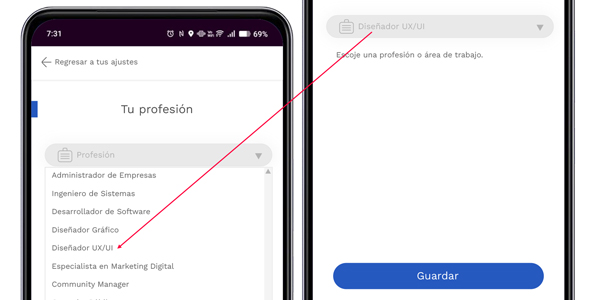
After choosing your profession or field of work, click save. Save.
When you click save, your profession will be registered. Then you can click return to your settings to exit.
Your assistant learns from the information you provide, so it is important that your information is complete.
We use cookies to make REMBRR work correctly and to improve your experience. Some cookies are essential, while others help us analyze traffic or personalize content and marketing.
You can accept all cookies, reject non-essential ones, or manage your preferences.
Fill out the following form and we will contact you shortly.
Fill out the following form and we will contact you shortly.
Fill out the following form and we will contact you shortly.
Fill out the following form and we will contact you shortly.
Fill out the following form and we will contact you shortly.
Fill out the following form and we will contact you shortly.
Fill out the following form and we will contact you shortly.
Fill out the following form and we will contact you shortly.